On this page8
When a site loses search traffic after a redesign or a platform move, the cause is almost never the new design. It’s the old URLs. Pages that ranked for years suddenly return a 404, the links other sites pointed at them go nowhere, and search engines have to rediscover the site from scratch.
A redirect map prevents that. It’s not glamorous work, and it’s easy to leave until the week of launch. It deserves better, because it’s the part of a migration that protects the traffic the client already has.
What a redirect map is
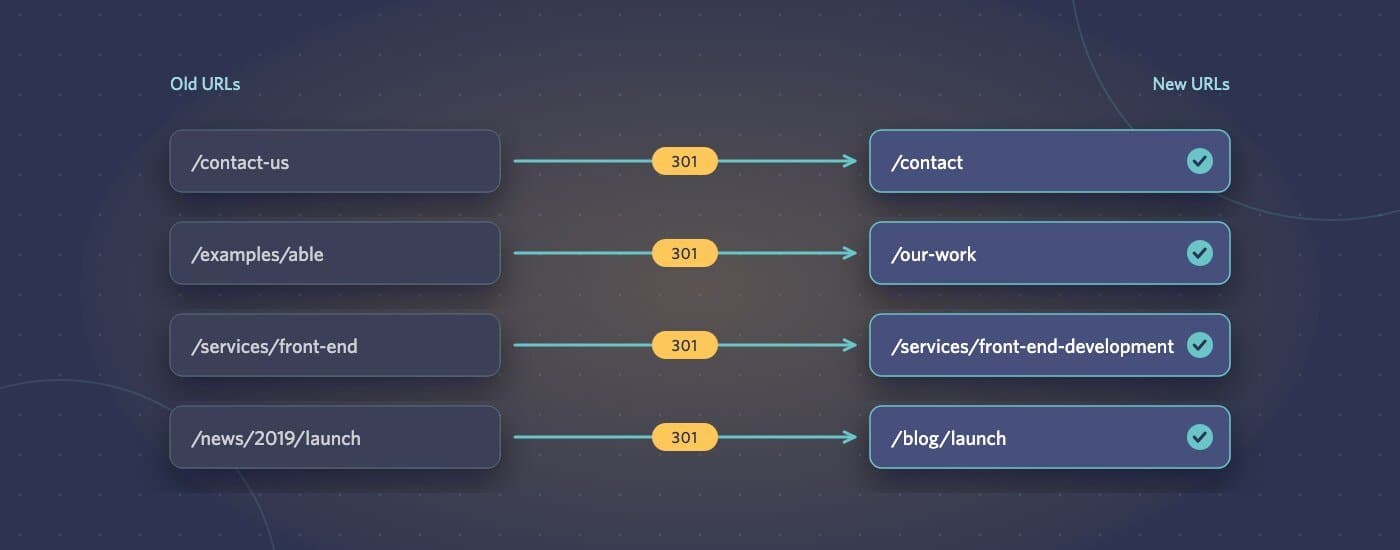
A redirect map is a list of every URL on the old site that matters, paired with the URL that should replace it on the new site. At launch, each old address sends visitors and search engines to its new home with a permanent (301 or 308) redirect. That tells search engines the page has moved rather than disappeared, and most of the old page’s ranking signals carry across.
Step 1: Collect every old URL, from more than one source
The site’s own menu is the least reliable list of its pages. Pull URLs from several places and combine them:
- The current XML sitemap, if the site has one
- A crawl of the live site with a tool such as Screaming Frog, which finds pages that aren’t in the sitemap
- Google Search Console: the pages that actually get impressions and clicks
- Analytics: landing pages that bring in visitors from any source
- Backlink data: pages that other websites link to, which may include old URLs nobody remembers
Blog posts, old campaign pages and PDFs are the usual forgotten items. They often attract more links than the homepage.
Step 2: Decide where each one goes
Work through the list and give every URL one of three outcomes:
- Same content, new address: redirect straight to the new page. This should cover most of the list.
- Content merged or replaced: redirect to the closest new equivalent, such as an old service page to the new service page that covers the same work.
- Content genuinely gone: redirect to the most relevant parent page, or let it return a 404 or 410 if there’s truly no equivalent and nothing links to it.
Resist sending everything to the homepage. Search engines tend to treat a mass redirect to the homepage like a missing page, so the old page’s value is lost anyway, and visitors land somewhere that doesn’t answer what they came for.
Step 3: Look for patterns, not just one-off rules
Where the URL structure changes predictably, one pattern rule can cover hundreds of pages. For example, /news/2019/05/post-name becoming /blog/post-name. Pattern rules are easier to maintain, and they also catch URLs you missed in step 1.
Test each pattern against real URLs from your list before launch. A rule that’s slightly too broad can quietly send the wrong pages to the wrong places.
Step 4: Avoid chains and loops
If the site has been migrated before, some old URLs already redirect. Don’t stack a new redirect on top of an old one (A to B to C). Update the old rules so every URL goes straight to its final destination. Chains slow visitors down and dilute what gets passed along. Loops, where two rules send a URL back and forth, break the page entirely.
Step 5: Test before and after launch
Before launch, run the whole old-URL list against the staging site and check that every one ends on a working page with a 200 status, in one hop. After launch, run it again against the live site, because server configuration, caching and CDNs sometimes behave differently in production.
Then keep watching for a few weeks:
- The Pages report in Search Console, for new “not found” errors
- Organic landing-page traffic compared with before the move
- Server logs or monitoring for 404s from old URLs you missed
A short dip in rankings after a big migration is common while search engines process the changes. A steep, lasting drop usually points to redirects that are missing or wrong, which is good news, because those can be fixed.
Other things that should move with the URLs
- Update internal links to point straight at the new URLs rather than relying on redirects
- Submit the new sitemap in Search Console
- Keep page titles and main content close to the old versions where rankings matter, at least at first
- Check canonical tags, structured data and hreflang on the new templates
Plan it early
The redirect map should start at the beginning of a migration, not the end. Once you know every URL that matters, it shapes decisions about the new structure, and launch week is spent checking, not scrambling.
If you’re planning a migration for a client, our website migration and replatforming work includes the full redirect map and post-launch checks. Send the current site through our project brief form and we’ll scope it.